
You spent time building your website, creating service pages, and writing blog posts. But what if some of those pages aren't even showing up in Google's search results?
One of the most overlooked aspects of search engine optimization (SEO) is website indexing. Fortunately, checking your website's indexing status is something you can do yourself for free!
What Is Website Indexing?
Website indexing is the process of Google discovering, reviewing, and adding your website pages to its searchable database.
Think of Google as an enormous library. Your website is a book, and each of your website pages contains valuable information. If Google hasn't added that information to its library, people searching for your services may never find it.
Just because a page is published on your website doesn't mean Google has indexed it.
Why Is Website Indexing Important?
When important website pages aren't indexed, you could be missing opportunities to:
Appear in Google search results.
Attract new customers searching for your services.
Increase organic website traffic.
Build visibility for your individual services.
Reach customers in your target cities and service areas.
Strengthen your overall local SEO presence.
Indexing doesn't guarantee high rankings, but it is an essential first step toward being found in Google's organic search results.
How to Check if Your Website Pages Are Indexed
Google offers a free tool called Google Search Console that allows you to monitor how Google discovers and indexes your website.
Step 1: Open Google Search Console
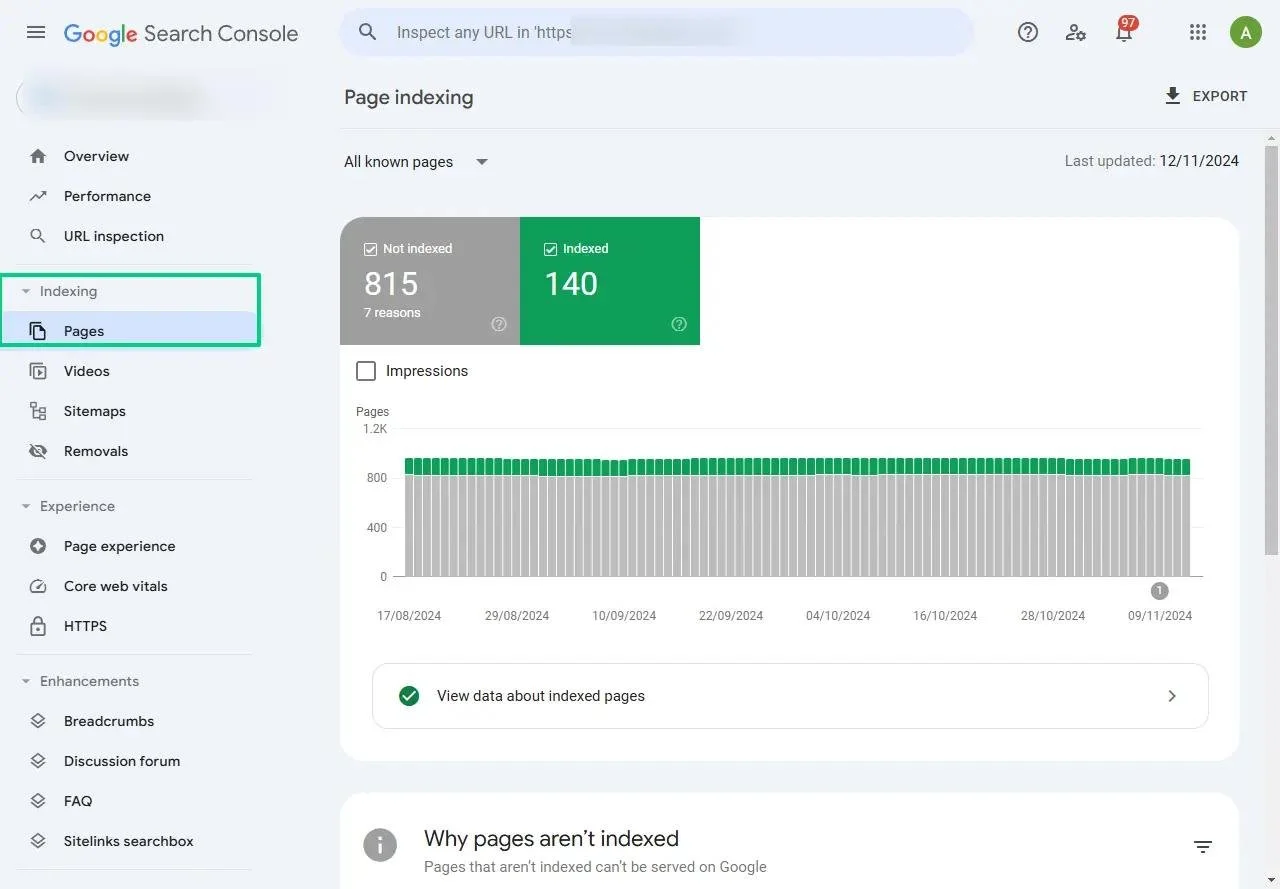
Visit Google Search Console and sign in using your Google account.
If you haven't already connected and verified your website, you'll need to do that first.
Step 2: Open the Pages Report
On the left-hand side of your Google Search Console dashboard, find the Indexing section and click Pages.
This report shows how many of your website pages are indexed and how many are not.
Scroll down to the section titled Why pages aren't indexed.
Step 3: Review These Two Important Categories
While there are several reasons Google may not index a page, two categories are particularly worth reviewing:
Discovered – currently not indexed
Google knows that the page exists but hasn't crawled it yet.
Crawled – currently not indexed
Google has visited the page but hasn't added it to its search index.
Click into each category to see examples of the affected website URLs.
Pay particular attention to important service pages, location pages, and blog posts that you want potential customers to find.
Step 4: Request Indexing
Once you've identified an important page that isn't indexed:
Copy the full website page URL.
Paste it into the URL Inspection search bar at the top of Google Search Console.
Allow Google to inspect the page.
Click Request Indexing if the page is eligible.
This asks Google to revisit the page and consider it for indexing.
Keep in mind that requesting indexing does not guarantee that Google will index the page immediately or at all. It can take several days or weeks.
There is also a daily limit of how many pages you can request indexing for!
What if Google Still Isn't Indexing My Pages?
Sometimes, requesting indexing isn't enough. Google may need additional reasons to consider a page valuable.
You can help by:
Adding helpful, original content to the page.
Making sure each page has a unique title and purpose.
Linking to the page from other relevant pages on your website.
Avoiding duplicate or repetitive content.
Submitting an updated website sitemap through Google Search Console.
Checking for technical issues that may prevent Google from indexing the page.
Not every page on your website needs to be indexed. Duplicate pages, redirects, private pages, and certain administrative pages may intentionally be excluded.
Focus on the pages that matter most to your business and your potential customers.
How Often Should You Check Your Website Indexing?
We recommend reviewing your indexing status at least once a month, especially if you regularly publish blogs, add services, or create new website pages.
It's also a good habit to request indexing after publishing an important new page or making significant updates to existing content.
Your Online Visibility Goes Beyond Your Google Business Profile
At Rank Rise Studio, we believe that a strong online presence requires more than simply maintaining a Google Business Profile.
Your website, Google Business Profile, online directories, backlinks, keywords, and overall SEO health all contribute to how easily potential customers can discover your business.
That's why our qualifying Google Business Profile management packages include access to a personalized SEO dashboard, providing valuable insights into your business's online visibility and opportunities for improvement.
Our goal is not just to manage your Google presence but to help you understand how to strengthen your entire online presence.
Is your business being found where it should be?
Contact Rank Rise Studio to learn more about Google Business Profile management, local SEO, and how we can help your business become more discoverable online.